Brand Guidelines
Scroll


© 2026
Welcome
Orion Services Group exists to create opportunity for exceptional people in the commercial and industrial skilled trades. Together, we're building a forever company.
We designed this guide to empower our network to march together as One Orion. Use what's here, and when something isn't covered, reach out before improvising.
For branding guidance, logo access, or general marketing inquiries contact Kelsea Brunner · Orion Marketing · kelsea@orionservicesgroup.com
Our Vision
Build a forever company that creates opportunity for exceptional people in the commercial and industrial skilled trades.

Our Core Values
Own It
Take responsibility for your results and empower others to own theirs.
Act With Care
Strive to do work you can be proud of today and in 100 years. Lead with humility, curiosity, and transparency.
Be Agile
Have a growth mindset, embrace continuous improvement, and keep reinventing yourself.
Win Together
Serve the team, learn from each other, and collectively raise the bar.
Tone Of Voice
Orion Services Group is one company, made of the best skilled trades businesses on the continent. Each company is led locally, and we all grow together.
We honor the tradespeople that join us by developing and empowering excellence from everyone at Orion.
We use natural, straightforward language that any audience can trust, from a first-year apprentice to a founder weighing the biggest decision of their life.
We make our claims plainly and declaratively: We grow forever. We grow businesses to change lives.
Orion Logo
Below you'll find approved versions of the Orion logo. Download any version you need. This page can be shared directly with external collateral providers to access vector files.
Primary Logo
Standard
This is the standard logo. It will be used on a white background in most cases.
Download logo

Full White Logo
This logo variation is available for use on a solid Orion blue background.
Download logo

White Text Blue Logomark
For use on black or very dark backgrounds such as black company polos.
Download logo
Orion University
The Orion University logo is available for any related projects. Download the .png or the full logo package including color variations and vector files.
Download logo
Orion Logomark
The logomark may be used for favicons and profile imagery on applications and other niche reduced visibility locations.
The isolated logomark should not be used in collateral, decks, emails, print materials or other assets where a standard logo can otherwise be used.
Download logomark
Abstain from generating logo variations to ensure the uniformity and crediblity of the Orion brand. Reach out with logo variation requests before improvising.
Colors
The colors are another essential part of our visual identity across all platforms. In the following section you will find the primary colors as well as an extended palette to be used for web.
Primary Colors
The primary color palette consists of 3 supporting colors and one brand color. These colors are used in our logos, on decks, on social media etc.
Color Palette For Collateral
When designing for the web and deck collateral, a more nuanced and extensive color palette is available to give the freedom to create more clarity in a design while still operating within the boundaries of our visual identity.
Orion Blues
Orion Greys
Tertiary Colors
Tertiary Colors may be used in moderation when you require an alternate option for items like charts, diagrams, or special highlights.
Color Usage Standards - Collateral Building Guide
These standards help us stay unified and expedite the creation of clear collateral for our network and partners.
• No gradients. Bands and washes are always flat, solid colors.
• Tertiary colors are highlights, not themes. Tertiary colors are to be uses for charts, diagrams or special highlights.
• Content backgrounds are white. To ensure contrast and clarity, never use creame or beige backgrounds on text. Schematic Gray (#f2f2f2) may be used as a highlight box behind text where necessary.
• One bold blue at a time. Never mix Orion blues in the same component.
Brand Font
Orion's brand font is Aptos, used for its precision, clarity and accessibility.
For efficiency, Aptos Display is used in headings (bold, 700 weight )
and subheadings (normal, 400 weight)
Aptos Display Bold - Headings
Aptos Display - Subheadings
Aptos - Body
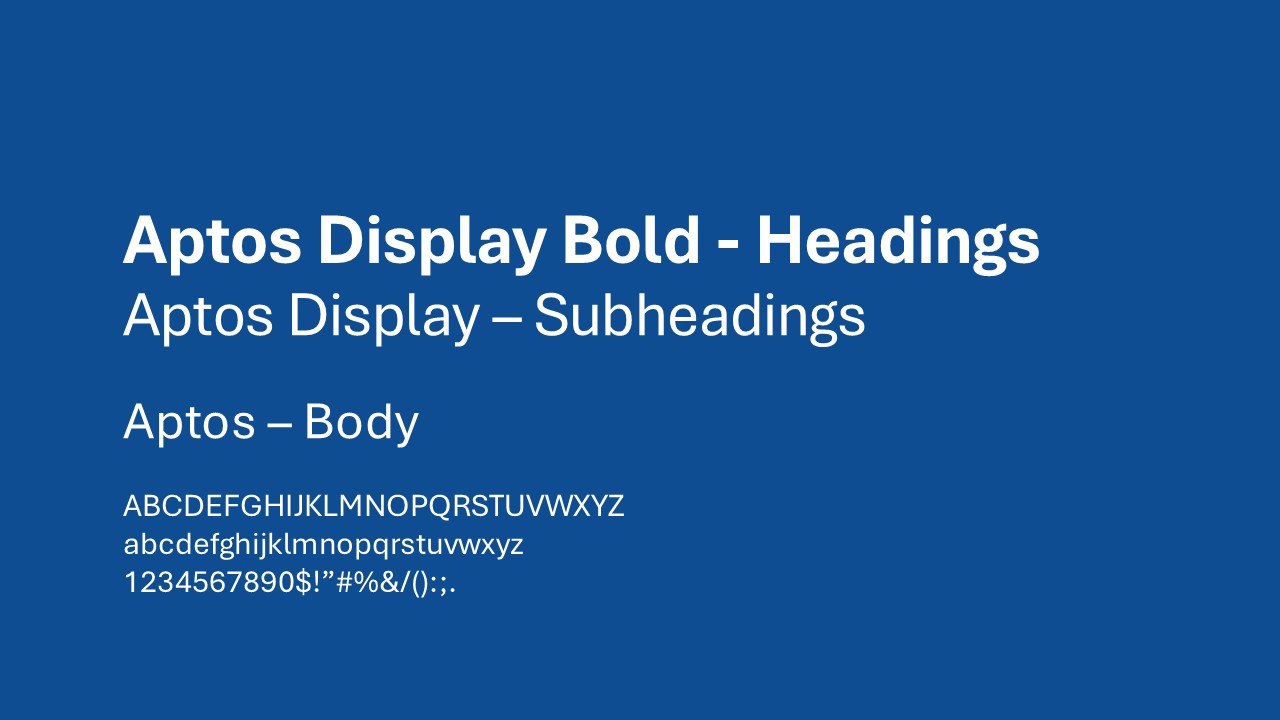
To install the fonts, download the font family using the button below. Unzip the file, select all items, right click and install.
Templates
In this section you will find available templates to download.
Email Signature
Use this template to set up your Orion Email signature
To install the email signature:
1. Open word document.
2. Select and copy the generic content including the logo (where preferred).
3. Paste into email signature section of your email software and edit the text accordingly.
4. Save changes.
Download Document
Orion Letterhead
This document is setup with the Orion Brand Colors and includes our primary logo.
Download Letterhead Document
LinkedIn Banners
Use these banners as the background image on your personal LinkedIn profile. Both are sized to LinkedIn's recommended 1584 x 396 dimensions.
The official Orion Services Group LinkedIn is linked here.
If you are a member of an Operating Company within the Orion network, list your experience under your operating company, not Orion Services Group.
Click the blue PNG button below each graphic to download the banner.




Claude Design Skill (Beta)
Use this skill when generating or updating collateral in Claude. **This skill is not guaranteed in its accuracy. Be sure to double-check figures and reach out with any questions.
To install the skill:
1. Download Orion-Design-System.zip
2. In Claude, Go to Settings -> Customize-> Skills -> Add -> Upload a Skill and upload the Orion-Design-System.Zip
3. To use the skill, type /orion-design in your Claude dialogues.
Download Skill Package